NETWORK OPERATIONS CENTER
ANDROID
These instructions are based on an Android 4.4.4 device and may vary depending on your device and the version of Android it uses.
Proxy access on Android devices does not work if you are using mobile networks (3G or 4G).
A prerequisite for proxy connections on Android devices is that we are connected to a wireless network (Wi-Fi). The setting for the proxy server on the device must be made for each wireless network individually and cannot be applied as a general setting for all networks.
After opening the device’s Wi-fi and accessing the list of available networks, pressing and holding the network for which we want to enable the proxy server a tab appears with the options for that network.
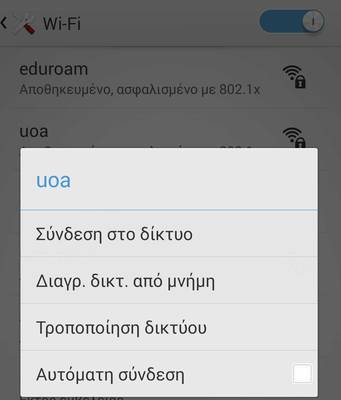
By activating the option "Modify network" the following tab appears with the network settings:
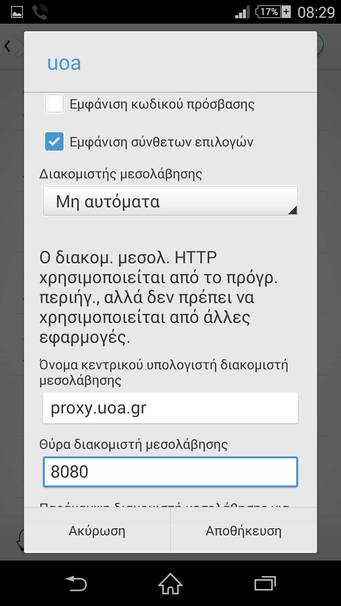
More specifically we should select:
- Show advanced options
- Proxy server: Manual
- Proxy server host name : proxy.uoa.gr
- Proxy server port: 8080
By clicking 'Save' the network configuration is complete and the next time you connect to this network the connection will be made through the proxy server.
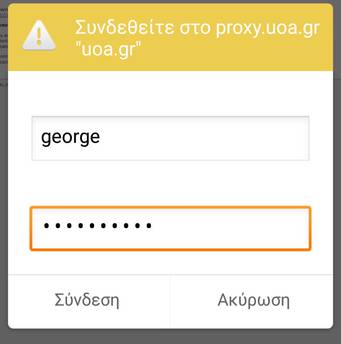
In case you are connecting to the network from a wireless network that is not part of the NKUA network to connect to the network you will be prompted to enter your username and password.
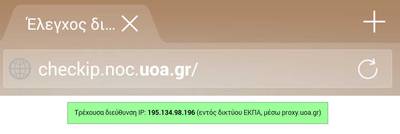
Check IP Address
If you want to check that you have received a university IP address, you can visit: