NETWORK OPERATIONS CENTER
IOS
iPhone - iPad
Instructions for setting up the proxy server on iPhone. The same procedure applies to iPad.
Note: Regarding the following setup to work, it is necessary to connect the device to a wireless network (Wi-Fi).
Step 1
Go to the device Settings and then to the Wi-Fi field. Make sure you are connected to a wireless network (Wi-Fi).
Then click the wireless network you are connected to.

Step 2
At the bottom of the screen, in the "HTTP PROXY" section, click on the "Manual" field.
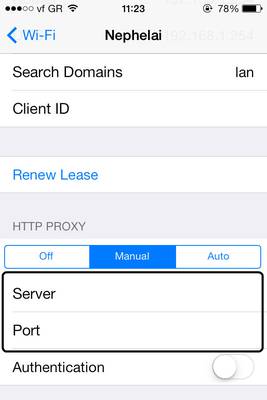
Then type in the field
• Server: proxy.uoa.gr
• Port: 8080
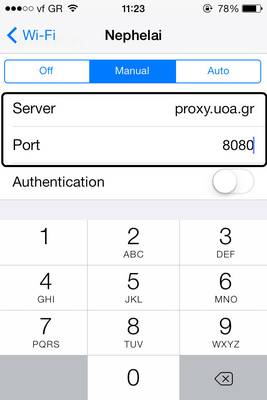
Note: If you want you can activate the Authentication field, while in the username and password fields enter your University of Athens account details. If this is applied the configuration is complete. Otherwise, follow Step 3.
Step 3
By opening a browser window on your device, you will be asked to enter your University of Athens account details (username and password).
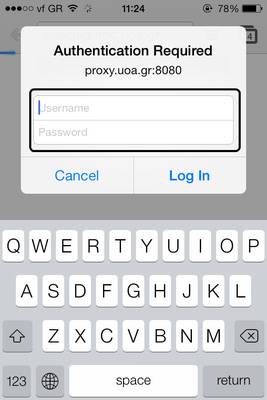
The proxy server setup is complete.
Check IP Address
If you wish to verify that you have received a university IP address, you can visit::