
NETWORK OPERATIONS CENTER
WINDOWS: FIREFOX
Instructions for setting up the proxy server in Windows, for Mozilla Firefox.
Step 1
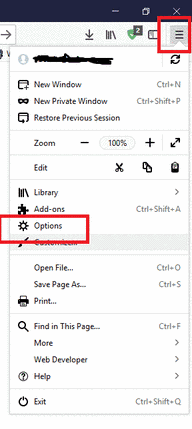
Go to the top right of the icon with three parallel lines, click on it and select "Options" from the menu that opens.

Step 2
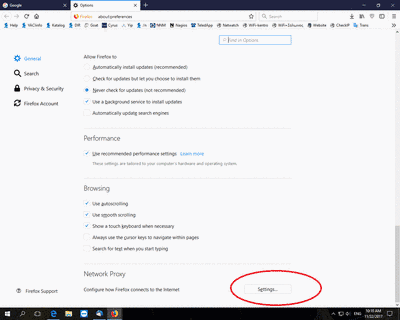
Then at the bottom of the page click on the "Settings..." located to the right of "Network Proxy".
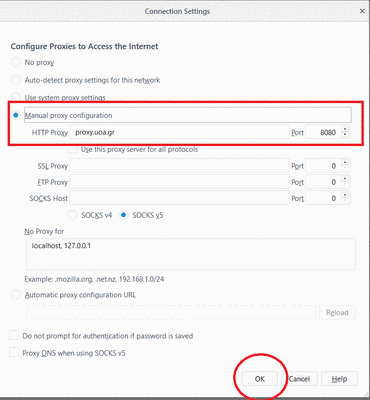
In the window that appears, click and check "Manual proxy configuration", in the "HTTP Proxy" field type "proxy.uoa.gr" and in the "Port" field type "8080" and click the "OK" button.
Step 3
Opening a browser window on your device, you will be asked to enter your account details (username and password) that you have at the University of Athens.

The proxy server setup is complete.
Check IP Address
If you want to check that you have received a university IP address, you can visit: