
NETWORK OPERATIONS CENTER
APPLE MACOS X
Installation and setup procedure
Download Tunnelblick software (from the "Stable Releases" section, depending on the operating system version).
Mount the disk image (dmg) and run the installer, double-clicking on the .pkg file.
Download and install the file containing the VPN configuration:

Use - Operation
When the Program is started, the Library/openvpn location is checked for configuration files and an icon appears in the toolbar (left of the time indicator).
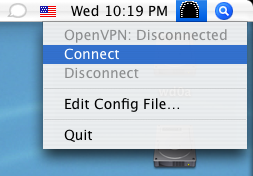
Selecting the icon a menu appears where we select the connect command to activate the service. Throughout the connection the icon will show active.
Check IP Address
If you want to check that you have received a university IP address, you can visit: