
NETWORK OPERATIONS CENTER
FREQUENTLY ASKED QUESTIONS (FAQ)
- I have an account at the University of Athens (Teaching/Administrative staff, student) how can I connect wirelessly to the network?
To connect for the first time, it is necessary to install the Configuration File. Select the network SSID: uoa-webonly or any other network you have a connection to download the Configuration File from https://wifi.uoa.gr/ (Full Access).For Android devices before connecting, first download the geteduroam app from Google Play or App Store for Apple devices.
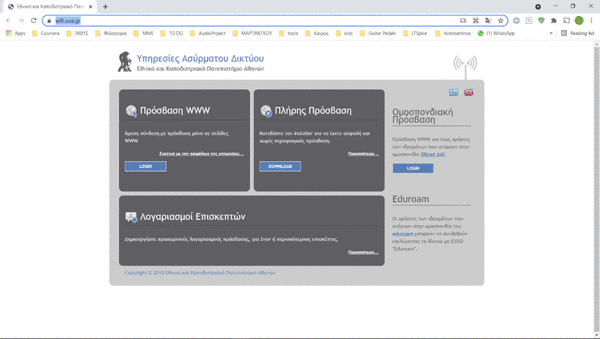
After installation select the network SSID:uoa and log in with your account name and password. You can alternatively use the same way to connect to the network SSID: eduroam. With both options you have full network access.
If from https://wifi.uoa.gr/ you select Access WWW, then you have the option of simple Internet access for browsing without the requirement to install the Installer.
- I am a visitor to the NSCA how can I connect wirelessly to your network?
If you have an account with an institution participating in either GRNet AAI or Eduroam you can connect by following the instructions (Members of the GRNet federation of institutions, Members of institutions participating in Eduroam)
Otherwise, a member of NKUA will have to create a guest account for you via https://guest.uoa.gr/. By activating his/her guest account the visitor can either connect to the SSID:uoa-webonly network (for Internet browsing only) or to the SSID:uoa network following the login instructions addressed to the Members of the University of Athens.
- I belong to an institution participating in Eduroam. How can I connect wirelessly to your network?
Please refer to your institution's login instructions to connect to the network SSID: eduroam. To connect, select the network " eduroam" and then fill in the name and account code assigned by your institution.
- I belong to an institution participating in the GRNet federation. How can I connect wirelessly to your network?
GRNet AAI members can only connect to SSID: uoa-webonly for Internet browsing with the account name and password assigned by their institution.
To access all services provided remotely by their home institution, they must select the SSID: eduroam network by following your institution's instructions for connecting to the SSID: eduroam network.
If you are a member of the NKUA at a location where there is coverage of the SSID: eduroam network you will need to follow the login instructions listed on the NKUA Members page.